Showing posts with label Adapters. Show all posts

Thursday, 2 June 2011

Configuring/Using SFTP Adapter for BizTalk Server

In Healthcare Integration Projects, vendors prefer to use SFTP over normal FTP for enhanced Security.

BizTalk Server doesn’t include SFTP adapter by default. Though we have the choice of developing a Custom SFTP Adapter, we can go with the SFTP Adapter available in codeplex.

1. The Major step in Using SFTP adapter is to setup SFTP Server on your Dev Machine for Testing.

You can refer this link for more details on Setting up SFTP Adapter .

2. Once SFTP Server is setup, configuring the Adapter is very simple. (Much of the details are available with the documentation given by codeplex)

You will have to configure few of the properties of SFTP Adapter as shown below. (There are still a number of properties that can be configured. But the mandatory ones are listed below.)
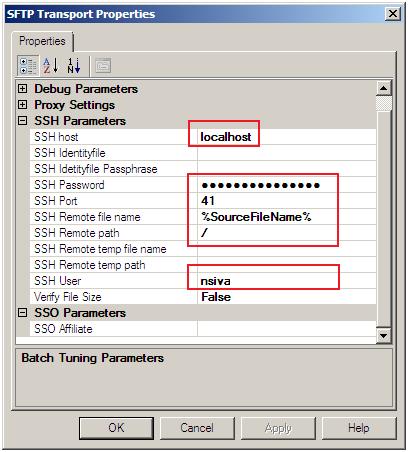


Changing the Output Filename in SFTP Adapter:

3. SFTP Adapter from codeplex supports %sourcefilename% macro. You can refer the documentations for more details. This macro can be used to change the output file name.

To do this, for the message that is being sent to SFTP Adapter, add the following property in a Message Assignment Shape and set the SSH Remote Filename Property to % sourcefilename% as shown in above figure.

msgSFTP(FILE.ReceivedFileName) = “YourDesiredFileName.extension”;

Else, we can download and modify the source code as per your wish.

- Shiv
Web Counters

Sunday, 20 February 2011

An alternative to SQL Receive Adapter

Details about SQL Receive Adapter can be found here.

It simply Polls SQL Server DB for data.

Though this is an useful adapter, at times, it increases load on SQL Server with unnecessary calls.

This adapter is not worth using in scenarios where you are not sure of getting data all the times.

In such cases you can go for alternative design, wherein you can get notification to BizTalk Server, whenever new data is available in SQL Server.

This design can be done as follows.

NewData Comes to SQL Server -> Write a trigger that fires upon new data arrives -> Call a .NET function from the trigger -> From the .NET Function, notify BizTalk Server that new data has arrived (Say for eg: Save a dummy file in a folder and let BizTalk be notified on the new data or Call a BizTalk Orchestration Exposed as  a Service etc) -> Have your Logic to Fetch the new Data using an Stored Proc.

Rather than going with the standard polling approach, this new design will help us to use the features available with SQL Server and reduce unnecessay calls to SQL Server.

Hope its helpful.

-Shiv

Saturday, 4 December 2010

How to change the Output file name in BizTalk File Adapters?

In Many situations we may have to save the file in the Output folder in a proper format.

BizTalk Send Port with File Adapter supports the following formats (macros) for the files saved.

%MessageID%
%datetime%
%SourceFileName%
%time%

Incase if we want the output file name to be some thing other than the available macros, we need to do some coding either in the Orchestration or in the Pipeline.

This Post will show you how you set the output file name in an Orchestration.

Scenario: Create a schema, receive a file of that type and set a name for the file and save it back to an output folder.

1. Create a sample schema in a BizTalk Project and add an Orchestration to the project.
2. Create two messages of the Schema Created in above step
3. Add a Receive, Message assignment and Send Shape as shown below.
4. Configure the Receive shape to Receive Message_1, set activate to true.
5. Configure the Construct Message shape to construct Message_2 and Send shape to Send Message_2. Resulting Orchestration should look like below.


6. Add the following code in the Message Assignment shape.

Message_2 = Message_1;
Message_2(FILE.ReceivedFileName) = "MyOutputFile";

7. Add a receive and send ports and complete the Orchestration.


8. Deploy the Orchestration.

9. Configure the Send Port File Adapter as show below. (Change the file name to use %SourceFileName% Macro. (Case Sensitive)


10. Drop an instance of the Schema in the input folder, and see that the Output file name will be the same as what I have given in Step6.


The idea behind this is that, I have change the ReceivedFileName Context Property of the message received to my desired format and then I have used the % SourceFileName% macro.

The same can also be done using a Pipeline.

Hope it helps.
- Shiv

Sunday, 21 November 2010

Catching SOAP Faults from WCF Service in BizTalk Orchestration

This Link has the Structure of Soap Version 1.1 & 1.2 Fault Message

This post will show how to Catch a Soap Fault returned by a WCF Service in a BizTalk Orchestration.

  1. Consume a WCF Service and Implement the Logic for Sending the Request and Receiving the Response from the WCF Service.

  2. Right Click on the PortType and Select New Fault Message as shown below.

  3. A new fault port will then be created as shown below

  4. Now set the Message Type to either Soap Fault 1.1 or 1.2 as shown below

  5. Add a scope block to the Orchestration, set the transaction type to None and an Exception handler

  6. Give any Valid Name to the Object Name and Set Object Type to Fault_1

  7. Keep a Message Assignment shape in the Exception Handler and assign the captured fault to another Message

  8. Handle the Message as required


Note: Message_3 should be of Soap_Fault type as selected in Step 4.
- Shiv


Web Counters

Wednesday, 10 November 2010

Difference between publishing schema and publishing an orchestration as a WCF Service

One the major differences for publishing schema and publishing an orchestration as a WCF Service is the Coupling factor. Publishing an orchestration as a WCF Service leads to tight coupling. Where as publishing schema as a WCF Service achieves loose coupling.

When an orchestration is published as a WCF Service, the data (message) received via the WCF Service will be directly bound the Orchestration which is published.

On the other hand when a schema is published as a WCF Service, the data (BizTalk message) received via the WCF Service will be published to the BizTalk Server Message Box and hence any number of subscribers can subscribe for the message.

Post your comments if there are any more differences…

- Shiv


Web Counters